
If you want to change your IP address on your home computer, there are few ways that might work for you—some simple, some not. Before trying more complicated/technical methods described below, you can try something that's very easy.
- Simply turn off or unplug your modem for about five minutes. (You don't have to turn your computer off.) In many cases this alone will change your IP address when you go back online.
- If that doesn't work, try unplugging your modem overnight and checking your IP address the next morning.
Have laptop, go mobile
If you have a laptop, you can switch to a new IP address very easily, if only temporarily—but you can do it anytime you want.Just go to any coffee shop, bookstore or other place that offers free wireless Internet (Wi-Fi®). Your IP address will automatically change because you'll be using a different Internet connection to send email or join chat rooms.
How about a proxy?
If you're trying to change your IP address primarily because you want to access web-based forums, you may wish to look into using a proxy server. Learn more by reading our article on proxies.What next?
If you're not the technical type, contact your Internet service provider (ISP) and ask them if they are able to change your IP address or how long your connection needs to be off for your IP address to change.If you're up for more-advanced methods, and you use Windows, try the steps below and see if your IP address changes.
For Windows users
- Computer connected directly to a cable or DSL modem- Get to a command prompt. (START, run, cmd).
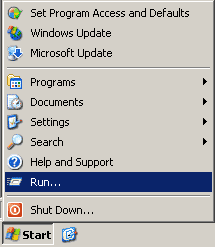
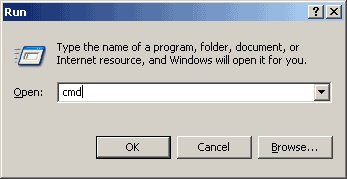
- Type "ipconfig /release" (without the quotes, on the command line by itself).
- Shut down computer.
- Turn off computer.
- Turn off all ethernet hubs/switches.
- Turn off cable/DSL modem.
- Leave off overnight.
- Turn everything back on.
For networks using a Router
- Log into the router's admin console. (Often http://192.168.1.1/)
- Release the IP address (method varies by router manufacturer)
- Turn off router, ethernet hubs/switches, and the cable/DSL modem
- Leave off overnight
- Next day, turn everything back on
If you have a router and you're still not having any luck, check to see if there is a "Clone MAC Address" option. Using it should change your IP address; however, in most cases you'll only be able to do it once.
Ip Address:
IP address From Wikipedia, the free encyclopedia For the Wikipedia user access level, see Wikipedia:User access levels#Unregistered_users. Page semi-protected An Internet Protocol address (IP address) is a numerical label assigned to each device (e.g., computer, printer) participating in a computer network that uses the Internet Protocol for communication.[1] An IP address serves two principal functions: host or network interface identification and location addressing. Its role has been characterized as follows: "A name indicates what we seek. An address indicates where it is. A route indicates how to get there."[2] The designers of the Internet Protocol defined an IP address as a 32-bit number[1] and this system, known as Internet Protocol Version 4 (IPv4), is still in use today. However, due to the enormous growth of the Internet and the predicted depletion of available addresses, a new version of IP (IPv6), using 128 bits for the address, was developed in 1995.[3] IPv6 was standardized as RFC 2460 in 1998,[4] and its deployment has been ongoing since the mid-2000s. IP addresses are binary numbers, but they are usually stored in text files and displayed in human-readable notations, such as 172.16.254.1 (for IPv4), and 2001:db8:0:1234:0:567:8:1 (for IPv6). The Internet Assigned Numbers Authority (IANA) manages the IP address space allocations globally and delegates five regional Internet registries (RIRs) to allocate IP address blocks to local Internet registries (Internet service providers) and other entities. Contents 1 IP versions 1.1 IPv4 addresses 1.1.1 Classless subnetting 1.1.2 Classful subnetting (historical) 1.2 IPv4 address exhaustion 1.3 IPv6 addresses 1.3.1 IPv6 private addresses 2 IP subnetworks 3 IP address assignment 3.1 Methods 3.2 Uses of dynamic address assignment 3.2.1 Sticky dynamic IP address 3.3 Address autoconfiguration 3.4 Uses of static addressing 4 IP addressing 5 Public and Private Addresses 5.1 Public addresses 5.2 Private addresses 6 Modifications to IP addressing 6.1 IP blocking and firewalls 6.2 IP address translation 7 Diagnostic tools 8 See also 9 References 10 External links IP versions Two versions of the Internet Protocol (IP) are in use: IP Version 4 and IP Version 6. Each version defines an IP address differently. Because of its prevalence, the generic term IP address typically still refers to the addresses defined by IPv4. The gap in version sequence between IPv4 and IPv6 resulted from the assignment of number 5 to the experimental Internet Stream Protocol in 1979, which however was never referred to as IPv5. IPv4 addresses Main article: IPv4 § Addressing Decomposition of an IPv4 address from dot-decimal notation to its binary value. In IPv4 an address consists of 32 bits which limits the address space to 4294967296 (232) possible unique addresses. IPv4 reserves some addresses for special purposes such as private networks (~18 million addresses) or multicast addresses (~270 million addresses). IPv4 addresses are canonically represented in dot-decimal notation, which consists of four decimal numbers, each ranging from 0 to 255, separated by dots, e.g., 172.16.254.1. Each part represents a group of 8 bits (octet) of the address. In some cases of technical writing, IPv4 addresses may be presented in various hexadecimal, octal, or binary representations. Classless subnetting IP networks are groups of adjacent addresses that are usually are routed similarly. Modern IP networks use Classless Inter-Domain Routing where any subnetwork has a common prefix where all bits in the address are identical. Network blocks are written with CIDR notation with an IP address giving the prefix, a slash character, and the number of bits in the prefix. For example, 192.0.2.0/24 indicates there are 24 bits in the network, and they are 192.0.2. Classful subnetting (historical) In the early stages of development of the Internet Protocol,[1] network administrators interpreted an IP address in two parts: network number portion and host number portion. The highest order octet (most significant eight bits) in an address was designated as the network number and the remaining bits were called the rest field or host identifier and were used for host numbering within a network. This early method soon proved inadequate as additional networks developed that were independent of the existing networks already designated by a network number. In 1981, the Internet addressing specification was revised with the introduction of classful network architecture.[2] Classful network design allowed for a larger number of individual network assignments and fine-grained subnetwork design. The first three bits of the most significant octet of an IP address were defined as the class of the address. Three classes (A, B, and C) were defined for universal unicast addressing. Depending on the class derived, the network identification was based on octet boundary segments of the entire address. Each class used successively additional octets in the network identifier, thus reducing the possible number of hosts in the higher order classes (B and C). The following table gives an overview of this now obsolete system. Historical classful network architecture Class Leading bits Size of network number bit field Size of rest bit field Number of networks Addresses per network Start address End address A 0 8 24 128 (27) 16,777,216 (224) 0.0.0.0 127.255.255.255 B 10 16 16 16,384 (214) 65,536 (216) 128.0.0.0 191.255.255.255 C 110 24 8 2,097,152 (221) 256 (28) 192.0.0.0 223.255.255.255 Classful network design served its purpose in the startup stage of the Internet, but it lacked scalability in the face of the rapid expansion of the network in the 1990s. The class system of the address space was replaced with Classless Inter-Domain Routing (CIDR) in 1993. CIDR is based on variable-length subnet masking (VLSM) to allow allocation and routing based on arbitrary-length prefixes. Today, remnants of classful network concepts function only in a limited scope as the default configuration parameters of some network software and hardware components (e.g. netmask), and in the technical jargon used in network administrators' discussions. IPv4 address exhaustion IPv4 address exhaustion is the decreasing supply of unallocated Internet Protocol Version 4 (IPv4) addresses available at the Internet Assigned Numbers Authority (IANA) and the regional Internet registries (RIRs) for assignment to end users and local Internet registries, such as Internet service providers. IANA's primary address pool was exhausted on 3 February 2011, when the last 5 blocks were allocated to the 5 RIRs.[5][6] APNIC was the first RIR to exhaust its regional pool on 15 April 2011, except for a small amount of address space reserved for the transition to IPv6, intended to be allocated in a restricted process.[7] IPv6 addresses Main article: IPv6 address Decomposition of an IPv6 address from hexadecimal representation to its binary value. The rapid exhaustion of IPv4 address space, despite conservation techniques, prompted the Internet Engineering Task Force (IETF) to explore new technologies to expand the addressing capability in the Internet. The permanent solution was deemed to be a redesign of the Internet Protocol itself. This next generation of the Internet Protocol, intended to replace IPv4 on the Internet, was eventually named Internet Protocol Version 6 (IPv6) in 1995.[3][4] The address size was increased from 32 to 128 bits or 16 octets. This, even with a generous assignment of network blocks, is deemed sufficient for the foreseeable future. Mathematically, the new address space provides the potential for a maximum of 2128, or about 3.403×1038 addresses. The primary intent of the new design is not to provide just a sufficient quantity of addresses, but rather to allow an efficient aggregation of subnetwork routing prefixes at routing nodes. As a result, routing table sizes are smaller, and the smallest possible individual allocation is a subnet for 264 hosts, which is the square of the size of the entire IPv4 Internet. At these levels, actual address utilization rates will be small on any IPv6 network segment. The new design also provides the opportunity to separate the addressing infrastructure of a network segment, that is the local administration of the segment's available space, from the addressing prefix used to route external traffic for a network. IPv6 has facilities that automatically change the routing prefix of entire networks, should the global connectivity or the routing policy change, without requiring internal redesign or manual renumbering. The large number of IPv6 addresses allows large blocks to be assigned for specific purposes and, where appropriate, to be aggregated for efficient routing. With a large address space, there is no need to have complex address conservation methods as used in CIDR. Many modern desktop and enterprise server operating systems include native support for the IPv6 protocol, but it is not yet widely deployed in other devices, such as home networking routers, voice over IP (VoIP) and multimedia equipment, and network peripherals. IPv6 private addresses Just as IPv4 reserves addresses for private or internal networks, blocks of addresses are set aside in IPv6 for private addresses. In IPv6, these are referred to as unique local addresses (ULA). RFC 4193 sets aside the routing prefix fc00::/7 for this block which is divided into two /8 blocks with different implied policies. The addresses include a 40-bit pseudorandom number that minimizes the risk of address collisions if sites merge or packets are misrouted.[8] Early designs used a different block for this purpose (fec0::), dubbed site-local addresses.[9] However, the definition of what constituted sites remained unclear and the poorly defined addressing policy created ambiguities for routing. This address range specification was abandoned and must not be used in new systems.[10] Addresses starting with fe80:, called link-local addresses, are assigned to interfaces for communication on the link only. The addresses are automatically generated by the operating system for each network interface. This provides instant and automatic network connectivity for any IPv6 host and means that if several hosts connect to a common hub or switch, they have a communication path via their link-local IPv6 address. This feature is used in the lower layers of IPv6 network administration (e.g. Neighbor Discovery Protocol). None of the private address prefixes may be routed on the public Internet.

No comments:
Post a Comment